
Related image

THE PROCESSOR


The function of the processor

The processor is a chip that controls all the
computer instructions by interpreting them as 
a binary code. 
The control circuitry pulls data in via the various ports, directs it along data buses,stores it in the memories and performs the calculations

Its roles

Performing calculations: the calculations are made by components in the cpu using binary code.
Data manipulation: The cpu can receive data from input devices, store the instructions and send data back to output devices
Decision making

Performance features

Clock speed: Is the speed at which the microprocessor executes instructions
 Cores:It is the processing unit.  For example, having two cores, multiply the processing power of the cpu by two. 
 Cache Is a small and fast memory, situated close to the cpu to accelerate the processor performance by storing copies of the most frequently used datas

Makes

Intel and AMD are the most famous and the best cpu brands, that have a lot of options and support, as a big community too. 
 ARM Is the builder of smartphone processors

Overclocking

Overclocking or Underclocking are processes that an owner can do to improve the computer functions.
Overclocking increase the voltage, hence having more processing power, instead, Underclocking reduce the voltage, therefore having more battery time.


Heat sinks – purpose, water cooled, air cooled
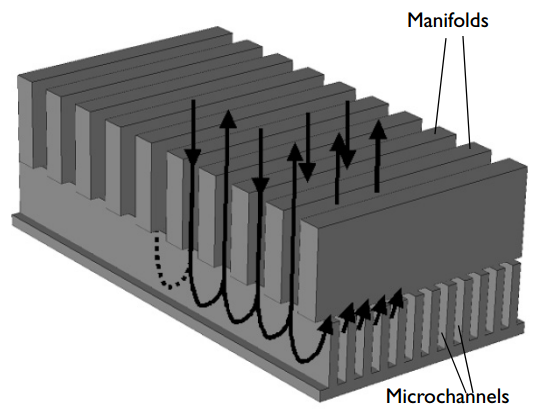
Image result for heat sink
As the processor is running a lot of instructions, it tends to heat up, therefore computers have different ways to dissipate the heat. A regular pc use a metal heat sink for this purpose alongside with fans.
 Another type of heat sink use sealed tubes with water to dissipate the heat from the processor, it uses the same principle as a car radiator. The water cooled system alows the computers to be thinner.


Comments

Popular posts from this blog

POWER SUPPLY FUNCTION: This internal hardware component supplies electric power to the computer by transforming Alternating Current (AC) into Direct Current (DC) and decrease the voltage into three different outputs: 12v, 5v and 3.3v.  Each voltage are dedicated to different elements of the computer RATING: The power is measured in Watts, higher the need; components such as hard drives and cards, higher the power needed.  CONNECTOR TYPES The most common is the Molex connector, although it's a bit old nowadays and we have more modern connections as SATA
PERIPHERALS They are auxiliary devices that add functionality to a computer, they can be: Input devices. They  gather information and send it back to the CPU as binary code. keyboards: are Input devices with different inputs buttons that represent each letter, number and sign. It transforms the binary code into characters. Mice : It helps you to interact with the interface by moving an object with a laser tracker that puts those tracking points into a vector position on the computer. Scanner:   this device use optical sensors to transform a   hard copy into a digital image.   Output devices. T hey do the reverse operation; transforming code into something that everybody can understand.  Screens:  They transform  the code from the computer into pixels,  displaying videos, images and text.   they can have different connections : VGA, HDMI, DVI... Speakers: These  devices receive information from the sound car...